Created by Drizzza

Conjure custom Rust terrain in minutes export straight to RustEdit…like it's magic

How it works

Conjure

Conjure Rust-tuned islands.

Roll procedural island seeds and shape them with simple sliders, every noise profile built around Rust's own terrain generation. Save favorites as shareable .hmseed files to reuse across projects.

Plan & Shape

Combine islands into one map.

Place, rotate and scale multiple island seeds into a single landmass, anything from tight archipelagos to full continents. Heights and noise scale per island and map size, all designed around Rust's proc gen.

Save & Export

Export straight to RustEdit.

Send out a ready-to-open Rust .map with terrain and painted splats together, or export as .raw, .png and .xml. Choose your final map size right in the export panel, and juggle several projects at once.

Multi-Island Gen

Full Custom Map Generation in One Click

Turn on multi-island randomize and every Conjure rolls a whole map, not just one island: continents, archipelagos, straits, rings and mainlands, each with real bays, peninsulas and offshore islands. Pick which styles to roll and cap how busy the map gets.
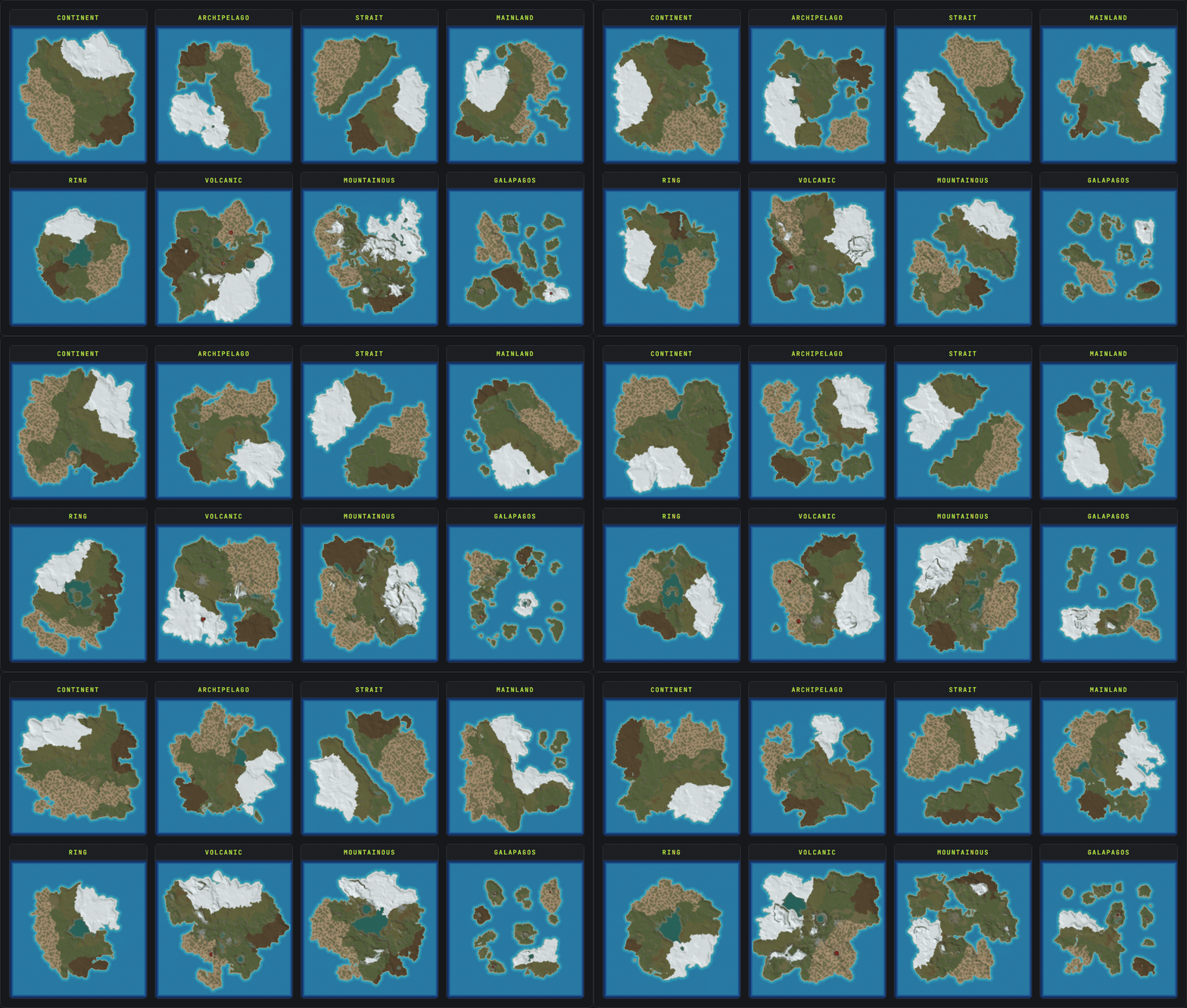
Animated grid of the five Crucible Heightmap full-map styles, Continent, Archipelago, Strait, Ring and Mainland, each cycling through generated Rust maps
Live 3D viewer

See it in 3D. Paint it like it's in Rust.

A real-time, in-game 3D view runs right inside the app, with real Rust ground textures, water and sky. Fly the camera around your island, paint the 8 Rust splat textures and sculpt terrain height live, and read the slope and grid overlays to see buildable land and in-game cells before it ever touches RustEdit.

Read the 3D viewer docs
$53.88 $ 44.99

/ Billed Annually

Get it in Crucible

Download the launcher, then subscribe in its Shop

Simple to use, affordable, Rust first heightmaps.

  • Direct .map, plus 16-bit .raw, .png and .xml export
  • Map sizes 513 / 1025 / 2049 / 4097
  • Live 3D preview while you combine islands
  • Save and share seed profiles (.hmseed)
  • Work across multiple projects
  • Automatic in-app updates
Crucible Heightmap

Download Crucible Heightmap

Get the free Crucible launcher, then unlock Heightmap in a few clicks and start conjuring terrain.

Tutorials & demos

View channel

Get updates & support on Discord

Build news, bug reports, and direct help with the tool. Drop in, say hi.

FAQ

What is Crucible Heightmap?
Windows desktop app for Rust map makers. Generate 16-bit island heightmaps, combine seeds, then preview and paint them live in a real 3D in-game view and export a ready-to-open Rust .map (or true 16-bit .raw and .png) to open straight in RustEdit.

It's built around Rust procedural generation, so beaches, slopes, and cliff prefabs feel naturally Rust-like in-game. The map size you select determines the output resolution of your export.

The Crucible Heightmap tool adds another layer to speed up your initial terrain process and increase your creative options.
What is RustEdit?
RustEdit is a community built standalone map editor for Rust developed by k1lly0u. You get full control over terrain, splat, biome, topology, alpha and prefab tools.

With the Crucible Heightmap tool you can quickly import custom terrain that would otherwise take ages to make by hand. Then with the RustEdit proc gen tool you can automatically populate a fully playable map with biomes, monuments, roads, etc. on top of the Crucible Heightmap you created.

Making it faster and easier than ever to unleash more creativity in the map building process.

Start to finish: generate a heightmap in Crucible, export a .map (or .raw), then open it in RustEdit and build (or proc gen) your monuments, roads, and biomes on top. Check the tutorials and demos above for video walkthroughs and guides with more detailed info.
Do I also need RustEdit?
Yes. Crucible Heightmap and a map editor like RustEdit work together, each doing a different job. A heightmap is your map's terrain skeleton: a 16-bit grayscale image where brightness is elevation, so it defines every hill, cliff, beach and ocean floor. Sculpting that by hand takes ages. Crucible generates Rust-tuned terrain for you in minutes and exports a ready-to-open .map (or a .raw heightmap), then you open that in RustEdit and use its tools (or proc gen) to drop monuments, roads, biomes and prefabs on top.

There are other Rust map tools out there too, like RustMapper, but RustEdit is the one I have hands-on experience with. Crucible plus RustEdit takes you from a blank slate to a unique, fully playable custom map, fast.
Can I sell or share the maps I make?
Yes. Heightmaps and maps you create with Crucible are yours. Use them freely, including commercially: run them on your own servers, share them, or sell them on marketplaces like Codefling or Lone.Design. Your subscription licenses the app itself, not what you make with it.
What heightmap resolution does RustEdit use?
RustEdit accepts 513×513, 1025×1025, 2049×2049, and 4097×4097 pixel heightmaps. Crucible matches these exactly based on your selected map size, exported as true 16-bit grayscale .raw (or baked into the .map export).
How can I play / test my map in Rust?
Spin up a local Rust server, load your map onto it, then connect and walk it in-game. I cover the full local hosting setup in this video tutorial.

🌲 Get 30% OFF your RUST server hosting with Pine Hosting!
Use code DRIZZZA here - https://pine.host/drizzza
How do I load my custom map on my local Rust server?
Save your exported RustEdit .map file somewhere (I like to create a new folder in my server root called maps), then point the levelurl in your server .bat file to the map file path. The code below shows how to properly update your server .bat for this:
@echo off
:loop

cd /d "C:\Path\To\Your\Server\Folder"

echo Starting server...
RustDedicated.exe -batchmode ^
+server.port 28015 ^
+server.levelurl "file:///C:\Path\To\Your\Maps\yourmap_v1.map" ^
+server.maxplayers 1 ^
+server.hostname "Your Server Name" ^
+server.identity "yourserver" ^
+rcon.port 28016 ^
+rcon.password YOUR_RCON_PASSWORD ^
+rcon.web 1

echo Server stopped. Restarting in 10 seconds...
timeout /t 10

goto loop
What to change:
  • cd /d path: the folder your RustDedicated.exe lives in.
  • server.levelurl: the full path to your .map file (keep the file:/// prefix).
  • server.hostname / server.identity: your server name, and a save-folder name for this server.
  • rcon.password: set your own and never share it.
Once it's running, launch Rust, press F1, and type client.connect localhost:28015 to join and walk your map.

Updating a map? Either save each new version under a different name (e.g. yourmap_v2.map) and point server.levelurl at it, or delete the old .map from both places it lives: your server identity folder (...\server\yourserver\) and your Rust client's map cache (C:\Program Files (x86)\Steam\steamapps\common\Rust\maps).
What do I need to run Crucible Heightmap, and does it run on Mac or Linux?
A Windows PC. That's it. Download Crucible, open Crucible Heightmap from the launcher, and subscribe in the launcher's Shop to unlock it.

Mac or Linux? It's a native Windows app, so it won't run on Mac or Linux out of the box. There are likely ways to get it working if you're an avid Mac or Linux user though.
How do I download and update Crucible Heightmap?
Download Crucible from the download page, or the Download link in the footer. Install it, open Crucible Heightmap from the launcher, and subscribe in its Shop to unlock the app.

Updates happen automatically when you open the app, no reinstalls and no chasing downloads. When a new version is ready you'll get an "update available" prompt on launch, and you can check anytime in Settings.
How are payments and licenses handled? Is it secure?
Checkout, billing, and license keys are all handled by Lemon Squeezy, a trusted payment provider and merchant of record. They process the payment, handle sales tax and VAT, manage recurring billing, and issue and validate your license key.

Your payment details go straight to Lemon Squeezy's secure, PCI-compliant checkout, they're never seen or stored by us. As merchant of record, Lemon Squeezy is also the name on your statement and the party responsible for tax compliance, so you're covered by an established platform rather than a one-person operation handling your card.
How do I manage my subscription?
Manage it right in the launcher's Account panel: change plan, update your card, cancel or resume. It also runs through the Lemon Squeezy billing portal: crucibleheightmap.drizzza.com/billing, the Manage subscription link in the footer. Log in with the email you bought with and you'll get a one-time login link.

You stay active through the rest of whatever you already paid for, then the launcher stops opening the app. Anything you made stays on your PC.

Changed your mind? If you resume before your billing cycle ends, it's the same subscription with the same license key, nothing breaks. If the subscription fully expires and you buy again later, that's a new order with a brand-new key, and the old one won't work anymore.
Can I use it on more than one PC?
Up to 2 Windows PCs per license. Switching rigs? Hit "deactivate" in the launcher on the old one first. That frees the slot, then you can activate on the new PC.
I lost my key.
It's in a few places. The launcher's Account panel shows your license key right there. It's also in your purchase receipt email, and on the billing portal at crucibleheightmap.drizzza.com/billing, the Manage subscription link in the footer. Log in with the email you bought with.

Still stuck? Hit me up in Discord.